Tuesday, January 21, 2014

People and group field is imported as Single line of text field when imported as spreadsheet

Issue: When we create a list using import a spreadsheet and if you have an people and group field in the spreadsheet, after import the people and group field may change as single line of text field.

Workaround: Create a people and group field in the same list where you have imported the list.Following PowerShell script will read the values from single line of text field and update in the value in people and group field. Make sure your AD user profile is similar to the source list/site.

Add-PSSnapin Microsoft.Sharepoint.Powershell
[System.reflection.Assembly]::LoadWithPartialName("Microsoft.SharePoint")
$site = new-object Microsoft.SharePoint.SPSite("SiteURL”)
$web =  Get-SPWeb -Identity siteURL
$lista =$web.Lists["ListName"]
$items = $lista.items
foreach ($item in $items) {
  $user = $item["SingleTextColumnNameOfUserName"]
  write-host $useracc 
$useracc =  $web.EnsureUser( $user); 
$item["NewPeople&GroupFieldName"] = $useracc
write-host $useracc
$item.update()
}

$lista.update()


Wednesday, January 15, 2014

WSP Versioning


Versioning for WSP packages are possible, but we have to do it manually.

·     Embed the version number in the filename of the WSP.
·     Create a text file with the version information inside the package.

Solutions don’t have a version number included by default and it is recommended to add a version number to the solution name. With this approach we know which version of your solution is deployed.
For instance:
Use MyProjectSolution_v5000.10.1560.0.wsp as solution name for the build #1560.

AssemblyFileVersion
The AssemblyFileVersion is intended to uniquely identify a build of the individual assembly
Used for deployment. You can increase this number for every deployment. It is used by setup programs. Use it to mark assemblies that have the same AssemblyVersion, but are generated from different builds.
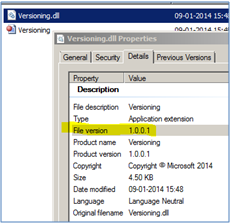
In Windows, it can be viewed in the file properties.
Example:
// Assembly mscorlib, Version 2.0.0.0
[assembly: AssemblyFileVersion("5000.10.1560.0")]
[assembly: AssemblyInformationalVersion("5000.10.1560.0")]
[assembly: AssemblyVersion("5000.10.0.0")]

AssemblyFileVersion is informational only.  Incrementing the version does not require a recompile of dependent assemblies.  It helps when browsing your bin folder to know which code version you have installed.
Assembly File Version

Code to read the current Assembly File Version
Assembly thisAssembly = Assembly.GetExecutingAssembly();
FileVersionInfo fvi = FileVersionInfo.GetVersionInfo(thisAssembly.Location);
Console.WriteLine(fvi.FileVersion);

PowerShell Command
[System.Diagnostics.FileVersionInfo]::GetVersionInfo("Location of your executable").FileVersion


PowerShell script can be used to update the AssemblyFileVersion when the project is build.

Source: 

Monday, December 16, 2013

Unknown server tag 'SharePoint:ScriptBlock'.

Error: Unknown server tag 'SharePoint:ScriptBlock'.

Issue: You will get above error when you use the application page in SharePoint 2013 using <SharePoint:ScriptBlock> and try to use that in SharePoint 2010.

Cause: ScriptBlock class is not available in SharePoint 2010 & 2007.

Resolution: Replace the block with <script type="text/javascript">

Sunday, December 15, 2013

This operation can be performed only on a computer that is joined to a server farm by users who have permissions in SQL Server to read from the configuration database. To connect this server to the server farm, use the SharePoint Products Configuration Wizard, located on the Start menu in Microsoft SharePoint 2010 Products.

Error: This operation can be performed only on a computer that is joined to a server farm by users who have permissions in SQL Server to read from the configuration database. To connect this server to the server farm, use the SharePoint Products Configuration Wizard, located on the Start menu in Microsoft SharePoint 2010 Products.

Cause: Got above error when I tried to access my SharePoint site and Central administration. The error says that current user is not able to access the database. Everything was working fine until I've crashed my VMWare and restarted.

Resolution:
1. Open Services.msc
2. Restarted SQL Server (SHAREPOINT) service
3. Noticed that the following services was disabled. Enabled both the service.
SQL Server Agent (SHAREPOINT)
SQL Server Browser

Friday, December 6, 2013

Close modal dialog after page validation passes

Requirement:
To open the default Create Group (newgrp.aspx) page as a dialog box from our custom page on a button click. Close the modal dialog box after page submits.
We created a copy of newgrp.aspx page and used that page to achieve this.

Issues we had:
1. Default “create group” page redirects to the people.aspx page after successful page submission.
2. Closing the dialog on Window.unload worked fine, but the dialog got closed even when the validation fails as validation refresh the page.

Solution:
Create an HTTPModule to check the current page and previous page details though HTTP events. Below is the HttpModule code we used to achieve this.

using Microsoft.SharePoint;
using Microsoft.SharePoint.WebControls;
using System;
using System.Web;
using System.Web.UI;
using System.Web.UI.WebControls;

namespace DSPModule
{
    public class DynamicModule : IHttpModule
    {

        string strParentPageURL = string.Empty;
        string strCurrentPageURL = string.Empty;

        public DynamicModule()
        {
        }

        public String ModuleName
        {
            get { return "DSPDynamicModule"; }
        }

        // In the Init function, register for HttpApplication events by adding your handlers.
        public void Init(HttpApplication context)
        {
            context.PreRequestHandlerExecute += new EventHandler(context_PreRequestHandlerExecute);
        }
        void context_PreRequestHandlerExecute(object sender, EventArgs e)
        {
            HttpContext currentContext = HttpContext.Current;
            Page page = currentContext.CurrentHandler as Page;
            if (page != null)
            {
                page.LoadComplete += new EventHandler(page_LoadComplete);
            }
        }
        void page_LoadComplete(object sender, EventArgs e)
        {        
             HttpContext currentContext = HttpContext.Current;
             if(currentContext.Request.UrlReferrer != null)
                strParentPageURL = currentContext.Request.UrlReferrer.ToString().Trim().ToUpper();

             strCurrentPageURL = currentContext.Request.Url.AbsolutePath.ToString().Trim().ToUpper();
             if (strParentPageURL.Contains("/_LAYOUTS/DSPHANDLER/DSPNEWGRP.ASPX") && strCurrentPageURL.Contains("/_LAYOUTS/PEOPLE.ASPX") && strParentPageURL.Contains("?ISDLG=1"))
             {
                 HttpContext.Current.Response.Write("<script type='text/javascript'>window.frameElement.commitPopup();</script>");
                 HttpContext.Current.Response.Flush();
                 HttpContext.Current.Response.End();
             }
        }
        public void Dispose()
        {

        }
    }
}

Make sure that you add the following entry in the web.config file of the web application at path "configuration/system.webServer/modules"
<add name="DSPDynamicModule" type=" DSPModule.DynamicModule, DSPModule, Version=1.0.0.0, Culture=neutral, PublicKeyToken=fa63464975c1a198" />

Feel free to discuss if you have better way of doing this.


Thursday, October 17, 2013

Move dll to Gac using powershell

Developers during debugging their code, move their dll to gac and reset IIS. To automate this and save time, we can create a powershell script.


[System.Reflection.Assembly]::Load("System.EnterpriseServices, Version=2.0.0.0, Culture=neutral, PublicKeyToken=b03f5f7f11d50a3a")
$publish = New-Object System.EnterpriseServices.Internal.Publish $publish.GacInstall("D:\Prasath\Workouts\Lookup\bin\Debug\SP.MyContent.dll")
iisreset

Save the above code as "somefilename.ps1"
To execute, right click the saved file and select "Run with Powershell"

Tuesday, October 15, 2013

Connect application service to a web application programmatically

The following code will connect a custom user profile application service to a web application.
(SharePoint 2010)


           SPSite site = new SPSite("http://current site url");

           //Get all Service Proxies in the farm
           SPServiceProxyCollection farmServices = SPFarm.Local.ServiceProxies;

            // Iterate all the proxies
            foreach (SPServiceProxy service in farmServices)
            {
                SPServiceApplicationProxyCollection serviceApplicationColl = service.ApplicationProxies;
                foreach (SPServiceApplicationProxy serviceApp in serviceApplicationColl.OfType<SPServiceApplicationProxy>())
                {
                    if (serviceApp.DisplayName == "My Custom User Profile" && serviceApp.TypeName.ToLower().Contains("user profile service"))
                    {
                        //Add the service proxy to the web application
                        site.WebApplication.ServiceApplicationProxyGroup.Add(serviceApp);
                       
                         // update the application proxy group
                        site.WebApplication.ServiceApplicationProxyGroup.Update();

                         //update the web application
                        site.WebApplication.Update();
                 
                    }
                }
            }